Practical Guide
How to Create an AI Bot in Telegram: A Knowledge-Base Chatbot Without Coding
A practical path from company materials and an @BotFather token to a visual Flow with RAG retrieval, a language model, conditions, follow-up questions, and verifiable answers.
Overview: A Telegram bot without coding is not a promise of an ideal assistant in five minutes. Code and your own server truly are unnecessary, but you still need to prepare knowledge, define boundaries, connect the channel, and assemble the logic. FileBrain Pro combines three layers: a ready-made integration, document-based answers, and visual Flows.
What Is an AI Bot in Telegram?
To the user, it is a familiar contact in the messenger. They open a private chat, ask a question in natural language, and receive an answer. There is no separate application to install, menu to learn, or support page to visit. The difference lies in the processing: the message passes through a language model, company knowledge, and configured rules.
A traditional button-based assistant expects a specific command or menu selection. An AI bot for Telegram understands free-form wording such as “Which plan does a five-person team need?”, “Where is the setup guide?”, or “Can I move the lesson date?” It can recognize the topic, clarify a missing fact, and retrieve relevant material.
A language model, or LLM, helps interpret the question and produce natural text. But the model should not be the only source. It has no automatic access to current company rules, new plans, or internal policies. A practical AI Telegram bot therefore combines an LLM with a knowledge base and restrictions.
RAG retrieval first finds suitable document passages, then passes them to the model with the question. This makes a document-answering bot rely on permitted context. If no source is found, the Flow can say so honestly, ask for clarification, or suggest contacting a team member.
Another layer is conversation logic. One message does not always contain enough information. The Flow asks a follow-up question, waits for the next reply, and stores it in a variable. For example, it can ask for team size before recommending a plan, or product version before giving technical instructions. A smart Telegram bot runs a controlled process rather than an unrestricted endless conversation.
FileBrain Pro's main advantage is the combination of “no coding + knowledge base + visual Flows.” The ready-made integration delivers messages, RAG provides verified context, and the Flow defines what to do in different situations. The team sees the path on a diagram and changes it without publishing Python code.
How Does an AI Bot Differ from a Regular Telegram Bot?
The word “bot” describes solutions with very different logic. They may look identical in chat, but their answer quality, preparation requirements, and control capabilities differ. It helps to distinguish four types before choosing a platform.
Button-Based Bot
It displays a menu such as “Plans,” “Delivery,” and “Contact a Manager.” A tree of predefined transitions runs behind it. This format is predictable and well suited to short operations, but it cannot understand a question that does not match the buttons. The more topics there are, the harder a deep menu becomes to maintain.
General-Purpose GPT Bot
A GPT bot for Telegram sends a message to an LLM and returns the generated text. It is more flexible than a button-based solution and can sustain a conversation. Without company sources, however, the model answers from general knowledge and the prompt. It may confidently state an outdated price or invent a nonexistent rule.
RAG Bot Based on Company Materials
A knowledge-base Telegram bot searches uploaded materials before generation. This RAG bot for Telegram passes relevant PDF, instruction, or page excerpts to the model, which answers within their boundaries. It is better suited to support, product advice, and internal policies.
AI Bot with Custom Flows
RAG solves the source problem, but a business also needs routing. An AI bot in Telegram can identify the topic, check a condition, send an additional message, wait for clarification, and only then call retrieval or the model. A financial question takes a safe branch, documentation receives an automated answer, and an unknown topic is handed to a person.
A ChatGPT chatbot in Telegram and a complete, controlled assistant are therefore not the same thing. What matters is not the model brand but the entire chain: inputs, permitted knowledge, prompt, conditions, waiting for a reply, and output. The higher the cost of an error, the more decisions should be enforced by rules rather than left to generation.
What Tasks Are Telegram Bots Used For?
The best starting process has repetitive questions, a current source, and a clear next step. Do not automate all company communication at once. Start with one audience and a small set of topics, then expand the scope based on the logs.
| Task | What the Assistant Does | When a Person Is Needed |
|---|---|---|
| Customer support | Answers FAQs, provides instructions, and clarifies the problem | A complaint, dispute, data change, or unresolved issue |
| Consultation | Compares products using verified materials | An individual price, contract, or outcome promise |
| Learning | Explains the program, schedule, and procedure | Work evaluation, conflict, or a personal decision |
| Internal knowledge | Finds a policy and briefly summarizes the relevant section | No permission for the material or approval is required |
| Classification | Identifies the topic and collects required information | Makes the final decision for a nonstandard case |
Customer Support
A customer support bot handles repetitive questions: how to get started, where to find a setting, which formats are supported, and where to submit a request. It is available outside team hours and does not make people wait for a link to a known instruction. An unsuccessful answer should route to a team member.
Product Consultation
A Telegram bot for business can ask qualifying questions and explain plan differences. It uses approved descriptions and does not assign discounts independently. After the initial conversation, the manager receives a clearer request: the goal, team size, required feature, and timeframe.
Student Assistance
Online schools automate answers about schedules, materials, access, and assignment rules. Personal data and student status require suitable context and separate restrictions. A generic model answer must not quietly replace an educator's assessment of complex work.
Documentation and Internal Knowledge
An employee or customer describes the problem in natural language, and RAG finds the relevant section of a large policy. The answer contains brief instructions and, when needed, a link to the source. Access to a private knowledge base must be designed separately: a convenient chat interface does not remove confidentiality requirements.
Collecting Information in Conversation
The Flow can ask sequentially for the request category, product version, and steps already taken. User Input pauses execution and waits for the next reply. The value is stored in a variable and used later. This is more convenient than a long form, but do not request information unnecessary for resolution.
How an AI Bot Works: Message Architecture
To the user, the exchange looks like ordinary messaging. Internally, each request passes through several systems. Understanding the path helps diagnose errors and distinguish a channel problem from retrieval, model, or Flow issues.
- The user writes a message. It may be a question, clarification, or answer to a previous prompt.
- The platform passes the event. The connected webhook sends the text and chat data to FileBrain Pro.
- The Flow determines the logic. The input node writes the message, session identifier, and available user data to variables.
- RAG retrieves information. Retrieval selects relevant passages from the project's knowledge.
- The LLM produces the result. The model receives the question, context, and instructions defining the permitted answer.
- The output returns the text. The answer is sent to the original chat through the connected bot.
The order need not be linear. You can classify the topic before RAG, check for context after retrieval, and request clarification before the final message. An additional Telegram Message can send interim text such as “I'm checking the documentation” when it genuinely helps the user.
If User Input pauses execution, the next message continues the same session. The Flow receives the value in the specified variable and continues. This supports sequential conversations without a custom state store or manually implemented server-side waiting.
What You Need Before Starting
Prepare a minimum set before opening the editor. This reduces arbitrary decisions and helps you reach a useful test result faster.
- A Telegram bot. Create it through the official @BotFather account and obtain a token.
- A FileBrain Pro project. It stores knowledge, integration settings, and Flows.
- Materials. Current, noncontradictory PDFs, documents, pages, instructions, and FAQs.
- Communication rules. Tone, response length, permitted topics, and mandatory restrictions.
- Core Flows. Common questions, clarifications, refusals, and a route for unknown requests.
- Test questions. Common, ambiguous, adversarial, and undocumented examples.
The bot token is a secret that controls the channel. Do not send it in chats, insert it into public JavaScript, or store it in an open document. Enter it only in the designated integration form. If it is exposed, rotate it through @BotFather and update the connection.
The knowledge base should answer the audience's specific questions. A marketing presentation rarely replaces a support guide. Add definitions, procedures, terms, restrictions, and links. For changing data, specify the date and owner. One question should not have two contradictory current answers.
Start the Flow list with 10–20 reasons for contact. For each, record the expected outcome: a source-based answer, clarification, fixed text, or human handoff. These become future branches and tests. You do not need to describe every possible phrase in advance—the LLM helps recognize variable language.
How to Create an AI Bot in Telegram Without Coding
Below is the sequence from an empty project to a private test. Available setting names may evolve, so consult the Telegram integration documentation during setup.
1. Prepare the Project
Register with FileBrain Pro and create a separate project for the assistant. The project name should help the team distinguish the production knowledge base from an experiment. Initially, do not mix public customer materials and private internal documents in one set without a carefully designed access model.
2. Upload Documents or Pages
Add instructions, policies, and product descriptions. Wait for processing, then test several questions in the project's available test interface. If retrieval cannot find the required fact here, connecting a new channel will not fix the material.
3. Create a Bot Through BotFather
Open @BotFather, send /newbot, and choose a display name and unique username. The service will issue a token. Store it securely. You can also configure the description, avatar, and commands there, but these elements do not replace the main Flow.
4. Connect the Channel to the Project
Open the project integrations, select the bot setup, and paste the token. FileBrain Pro will register the webhook that receives messages. Do not run another handler with the same token in parallel unless you understand the architecture: conflicting event-retrieval methods cause unpredictable behavior.
5. Create a Telegram Flow
Open visual Flows, create a new Flow, and select the appropriate trigger. Only one active Flow for this connector is permitted per project, so different topics are typically represented by branches within one diagram. Drafts can be stored separately and activated after review.
6. Add the Input Node
Telegram Input writes the text, chat ID, session ID, name, and username to configured variables. The message variable is sufficient for a simple answer. Use other data only when the route requires it; do not automatically pass all available context to the model.
7. Connect RAG Search and Invoke LLM
RAG Search receives the question and returns retrieved passages. Invoke LLM uses the original query, search results, and system instructions. In the prompt, specify the role, tone, format, and prohibition on adding facts beyond the context. If retrieval is empty, route execution to a separate branch before calling the model.
8. Add Telegram Response
The output node accepts the final variable and returns it to the chat. Confirm that the value is not empty and contains the user-facing answer rather than a raw search object or service text. A prepared string can be passed for a fixed message.
9. Test It in a Private Chat
Activate the Flow, find the created contact, and start a conversation. Test a common question, unknown topic, clarification, and erroneous wording. Then inspect the execution logs: which nodes ran, what context was retrieved, and what reached the output.
This is how you can create a Telegram chatbot without Python or deploying your own application. But the mere fact that it answers does not mean the work is complete; quality must be verified on the test set. Only then should you publish the link to a broad audience.
Visual Conversation Flows
A Flow is a diagram of server-side logic. Nodes perform specific operations, and connections define the order. This approach makes behavior understandable: the team sees not only the prompt but also the checks before and after the model.
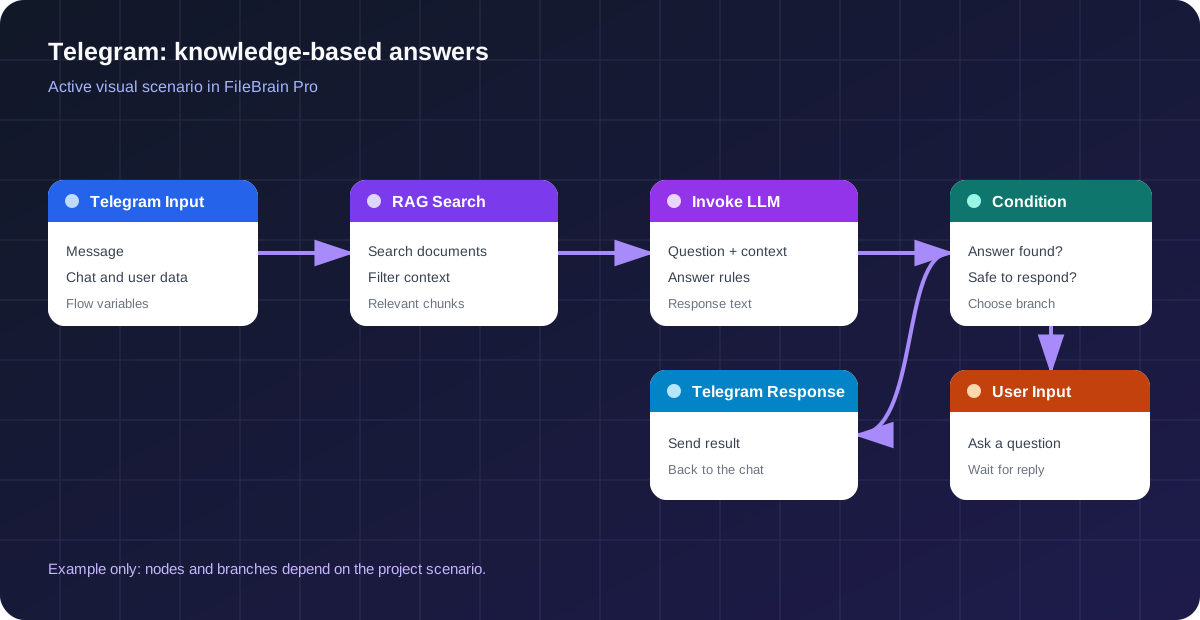
Conditions and Filters
A condition splits execution using a known value: category, context availability, classification result, or special flag. A filter can restrict input data. For example, refund questions go to a fixed safe branch, while informational queries go to RAG.
Variables
Variables carry values between steps: the original question, retrieved documents, topic, clarification answer, and final text. Give them clear names. A diagram with user_question and knowledge_context is easier to read than a set of unnamed results.
Different Answers by Topic
First, an LLM or rule classifies the message. Each category then receives a separate route. The sales branch uses plan descriptions, support uses instructions, and an unknown topic receives a proper refusal. This is more reliable than one prompt responsible for every process.
Additional Messages
Telegram Message sends an intermediate reply during execution. Use it purposefully to acknowledge a complex request or explain the next step. Do not add technical noise before every quick answer, or the conversation will become irritating.
Follow-Up Questions and Waiting
User Input displays a prompt and pauses the Flow until the next message. The answer is stored in the specified variable. After resuming, the Flow can check the value, retrieve information, and give the final answer. Every waiting point should have a clear question and handling for an unexpected reply.
Answers Based on a Knowledge Base
A neural network for a Telegram bot can write well, but reliability begins with sources. Upload PDFs, documents, instructions, policies, and prepared website pages to the project. The content must be approved for the audience that can access the bot.
RAG retrieval divides materials into passages and selects those semantically close to the question. The user may not know an internal term. “How quickly can I connect?” can still lead to an “activation time” section when the text is clear enough. The model then combines the retrieved information into a concise answer.
In the Invoke LLM instructions, establish a rule: use only the provided context, do not invent prices, dates, or guarantees, and return a clear signal when information is insufficient. A condition then routes the request to a safe message. A prompt without a server-side check is weaker because the model may not follow a prohibition perfectly.
Separate materials by product, audience, language, and version where possible. Tags help narrow retrieval. If a new plan has not yet been published for customers, it must not accidentally appear in public results. Replace or remove outdated instructions from the active set.
Updating the knowledge base does not require rebuilding the bot. After a document changes, RAG uses the new information while the diagram remains the same if the business process has not changed. This differs from button-based solutions, where every answer is often duplicated directly in a branch.
Regularly review questions without good results. They reveal knowledge gaps and the audience's language. Sometimes adding a short, precisely worded FAQ is enough; sometimes a large document needs restructuring. Do not try to compensate for a missing fact with a more creative model.
Without a Platform or Without Code: Development Options
“No coding” can mean different levels. Some builders provide only buttons, others add an LLM and knowledge, general automation tools connect services, and custom development provides maximum control. The choice depends on the logic, integrations, and team resources.
| Option | Complexity | Suitable For |
|---|---|---|
| Builder with prepared answers | Low | Simple button menus and fixed chains |
| FileBrain Pro + Flows | Low / medium | AI, RAG, clarifications, and custom logic |
| Make or n8n | Medium | Connecting several external services and APIs |
| Python and Bot API | High | Fully custom development and infrastructure |
A Telegram AI bot builder is useful when a team wants to manage knowledge and branches quickly without development. But a visual editor does not eliminate design work. You still need to understand inputs, variables, conditions, errors, and expected outcomes. A low barrier to entry does not remove responsibility for answers.
Make or n8n are suitable when the central task is passing data among a CRM, spreadsheet, email, and other services. For RAG, you must separately choose storage, retrieval, and a model or connect a ready-made API. More components mean more failure points and secrets.
Python is justified for a nonstandard protocol, complex authorization, custom infrastructure, high load with special requirements, or deep integration with internal systems. The team must implement the webhook, state, queues, retries, observability, and library updates.
If the task is to create an AI bot in Telegram that answers from documents and runs a controlled conversation, a ready-made connector and Flows reduce the technical work. Spend the saved time on materials, tests, and rules—they have a greater effect on the user outcome.
Ready-Made Integration or a Custom Bot Through the API
Fast Launch Without Development
The ready-made channel handles event receipt and message delivery. The team connects the token, activates the Flow, and manages logic visually. There is no need for a separate Python process, public server, webhook SSL, task queue, or continuous monitoring of a custom application.
Custom Implementation Through the API
A developer can write a Bot API handler and call the FileBrain Pro API for knowledge or an answer. This provides complete control over commands, keyboards, files, payments, and nonstandard events. At the same time, infrastructure, token security, logging, retries, and error handling become your responsibility.
When a Developer Is Required
Code is needed when ready-made nodes do not support a required action, a complex connection to a private system is necessary, permissions are unusual, or a custom management interface is required. A developer is also useful for architecture audits under demanding load and data requirements.
When a Visual Builder Is Enough
If the assistant receives text, retrieves documents, classifies the question, asks for clarification, and returns a message, standard nodes are usually sufficient. Conditions, variables, RAG Search, Invoke LLM, Telegram Message, User Input, and Response cover a typical first-line Flow.
The choice need not be final. You can build a pilot without code, collect real requests, and confirm value. If a narrow requirement appears later, extend the architecture through the API. This reduces the risk of spending months on a custom system before validating demand.
Security and Restrictions
The first secret is the @BotFather token. Store it only in designated settings, restrict staff access, and rotate it if exposure is suspected. Never place the token in a prompt or knowledge-base document. The model does not need to see it to compose an answer.
Review the knowledge contents. A public contact must not be connected to a folder containing internal contracts, personal data, and drafts. Even a good prompt cannot replace access separation. The index should contain only materials approved for the relevant audience.
Enforce action restrictions through the Flow structure. Financial decisions, account changes, discount promises, and legal interpretations should go to a person or a fixed process. The model can collect inputs and explain the general procedure, but it does not receive authority automatically.
Create a separate branch for unknown questions. A useful answer acknowledges the missing information, suggests clarification, or offers a team contact. Do not launch an LLM without context and ask it to “help somehow”; this increases the chance of confident fabrication.
Before public launch, test ordinary and edge-case messages. Try changing the topic, demanding the hidden prompt, sending long text, repeating a question after refusal, and replying unexpectedly to a clarification. Confirm that service variables and retrieved private passages are not exposed.
A project can have one active Telegram Flow. This simplifies handler selection but requires careful branch organization. Before activating a new version, confirm that it covers the current version's functions. Preserve the test set and run it after significant changes.
Common Launch Mistakes
Connecting an LLM Without a Knowledge Base
The model begins answering in generalities and inventing company details. That may be acceptable for a creative conversation partner, but not for support. Prepare sources and RAG first, then use the LLM for understanding and wording.
Failing to Define Boundaries
“Be a helpful assistant” does not define prohibitions, tone, length, or behavior when data is missing. Add explicit rules and screen risky topics with conditions. A critical decision cannot rely solely on compliance with a prompt.
Making the First Flow Too Complex
Dozens of branches are difficult to test, and the cause of an error gets lost. Start with one queue and a few topics. Once they work reliably, add classification, clarification, and additional actions one at a time.
Not Handling an Unknown Question
An empty retrieval result is normal. Without a branch for it, the user receives an error or fabrication. Prepare a brief refusal, a way to clarify the request, and a route to a team member.
Launching Without Test Conversations
One successful example says nothing about quality. Use real anonymized wording, typos, short replies, and adversarial inputs. Review not only the final text but also the path through the nodes and retrieved passages.
Trying to Replace Everything with One Prompt
An enormous instruction becomes contradictory and difficult to maintain. Separate responsibilities: documents store facts, conditions enforce mandatory decisions, variables carry state, and the LLM handles language tasks. That is the advantage of a visual process.
FileBrain Pro Capabilities
A Telegram AI bot in FileBrain Pro works without your own server and connects the channel to project documents. The ready-made integration receives messages and sends replies, while the visual editor manages the substantive logic.
RAG Search retrieves context from the materials. Invoke LLM classifies the question or composes a natural answer. Conditions and filters select a branch, variables preserve intermediate values, and text operations prepare data. User Input requests the next reply and pauses execution.
Telegram Message sends an additional message, while the output node returns the final result. Logs show execution and help identify whether a problem occurred in the input, retrieval, condition, model, or answer generation. See the Telegram Flows documentation for a detailed list of capabilities.
For the first pilot, build an Input → RAG Search → Invoke LLM → Response chain and a separate branch for missing knowledge. Then add one clarification through User Input. This process already demonstrates the core combination: no coding, knowledge-base answers, and controlled logic.
Create an AI Bot for Telegram
Upload materials, connect the token, and build your first response Flow in the visual editor.
Frequently Asked Questions
How can I create an AI bot in Telegram for free?
Create the channel through the free @BotFather service, register with FileBrain Pro, and use the available starter credits for a pilot. Ongoing costs depend on the plan and request volume, so unlimited free operation should not be promised.
Is Python required?
No, if you use the ready-made integration and Flows. Python is needed for a fully custom implementation, nonstandard actions, or infrastructure not covered by ready-made nodes.
How do I get a Telegram bot token?
Message the official @BotFather account, run /newbot, and choose a name and username. Copy the issued token into the integration settings and never publish it.
Can ChatGPT be connected?
The Flow uses Invoke LLM with an available model. For company answers, combine the model with RAG Search to supply current company context instead of relying on general knowledge.
How can I teach the bot to answer from documents?
Upload current documents, add RAG Search, and pass the retrieved context to Invoke LLM. Configure a separate answer for cases when retrieval returns no verified information.
How is RAG different from a regular GPT bot?
RAG retrieves information from selected materials before generation. A regular GPT assistant without retrieval does not automatically know your new plans, internal instructions, or policy changes.
Can multiple Flows be configured?
One Flow can contain many branches based on topic, conditions, and user answers. One active Flow for this connector is permitted per project; other versions remain drafts until activation.
Is my own server required?
Not for the built-in integration. FileBrain Pro receives the webhook and executes the Flow. You need your own server only when developing a separate application through the API.
How long does implementation take?
The technical connection is quick, but the production timeline depends on the readiness of sources, rules, and tests. A narrow pilot launches faster than automating every company process.
Can the logic be changed after launch?
Yes. Update documents and the Flow centrally. After a significant update, repeat the test conversations and only then activate the new version for the audience.