Online School Automation
AI Bot for GetCourse: How to Automate Support, Webinars, and Student Interactions
A practical implementation guide: from the knowledge base and student context to conversation routing, quality control, and safe handoff to a person.
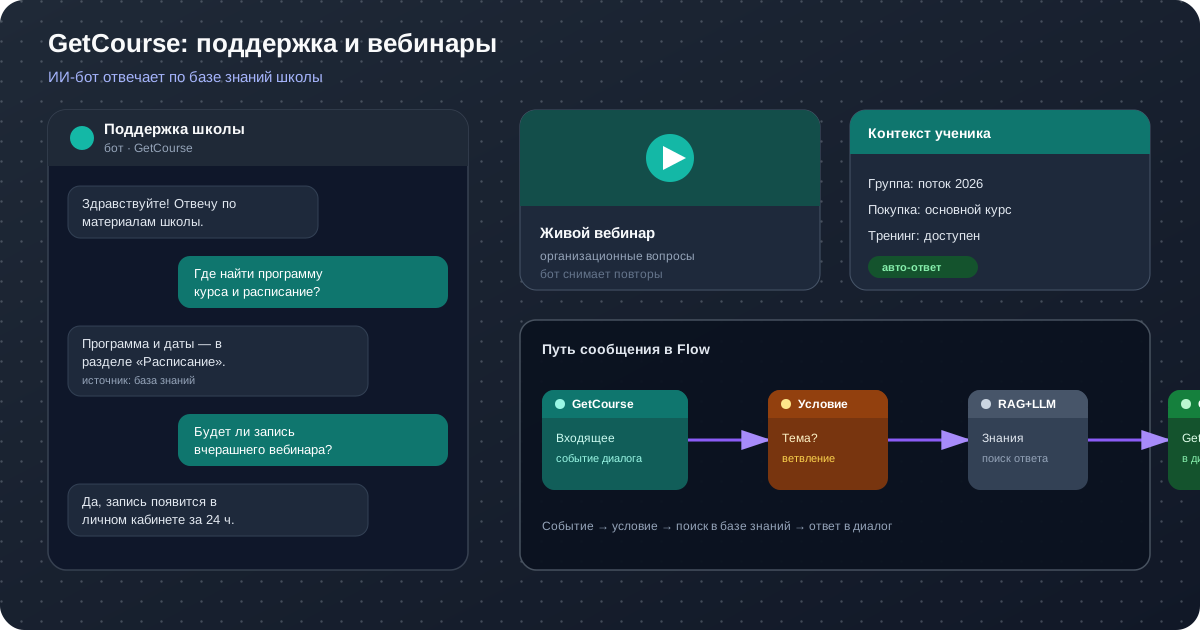
Overview: An AI bot for GetCourse is neither a separate chat window nor a set of rigid automated replies. It is a controlled Flow that receives an event from the school, understands the question, consults approved materials, considers groups, purchases, or available trainings when needed, and performs the appropriate action: replying, adding a note, changing the department, closing the conversation, or calling in a team member.
What Is an AI Bot in GetCourse?
Traditional automation responds to a predefined command or changes a status after a specific event. An AI bot in GetCourse works with natural language: a student might write, “Where can I find the course program?”, “Will yesterday's livestream be available as a recording?”, or “How do I submit my homework?” The wording varies, but the underlying intents are recognizable. A language model helps identify the intent, while the Flow defines which sources and actions are permitted.
It is useful to distinguish three layers. The first is the channel and school data: messages, conversations, users, products, and statuses. The second is intelligence: knowledge-base search, semantic understanding, and answer preparation. The third is business logic: conditions, branches, restrictions, department routing, and human involvement. AI integration with GetCourse connects these layers, so the response is not only human-like but also appropriate to the specific situation.
For example, a scheduling question may only require finding an approved instruction and providing a link. An access request first requires identifying the student and checking which trainings are available to them. A complaint about a charge cannot be closed with generic advice: it must be routed to a financial specialist together with the context. A good AI chatbot does not try to answer everything in the same way—it knows how to choose a safe path.
This solution acts as an AI team member in GetCourse with a clear job description. It is available around the clock, handles repetitive requests quickly, and remembers to include the right link. Its permissions are limited by the Flow, however, and its quality depends on the school's materials and escalation rules.
How Is It Different from a Regular Telegram Bot?
A Telegram bot primarily identifies the channel. It receives messages in the messenger and sends replies there. Behind it may be a simple menu, a complex Flow, or artificial intelligence—the term “Telegram bot” alone does not tell you which. An AI chatbot for GetCourse, by contrast, describes logic connected to the learning platform and its context.
A button-based bot asks the user to select an option such as “access,” “payment,” or “schedule.” If the question does not match the menu tree, the user goes in circles. AI understands free-form wording, asks for missing details, and searches the knowledge base for an answer. The Flow remains deterministic where that matters: group checks, department selection, or the prohibition on automatically resolving a payment dispute are governed by rules, not the model's creative guesswork.
The difference is especially clear in context. A messenger typically knows the chat ID and conversation history. A GetCourse support bot connected to the learning system can also use permitted information about the user and conversation. As a result, “Where is the program for my cohort?” is no longer an abstract question: the Flow can consider the student's group and available trainings and select the appropriate knowledge-base material.
There is no need to pit channels against one another. A school may use Telegram for notifications, a widget for leads, and GetCourse for student support. FileBrain Pro's visual Flows let you build logic for different connectors and reuse a common approach to knowledge, conditions, and control.
Where Can an Online School Use AI?
AI brings the most value to an online school where many questions are similar, an approved source of truth exists, and the next step is clear. It is better to start with one measurable process than with a promise to “automate everything.” The areas below are typically suitable for a pilot.
| Area | What the Assistant Does | When a Person Steps In |
|---|---|---|
| Student support | Finds instructions, schedules, completion rules, and links to materials | No answer exists in the sources, or an educator's assessment is required |
| Technical questions | Clarifies the device and error, then suggests a verified checklist | The outage is widespread, access remains unavailable, or administrator permissions are needed |
| Payments and access | Classifies the issue and collects the necessary information | A refund, disputed transaction, or manual change to terms is involved |
| Webinars | Answers organizational questions and sorts the message stream | An expert question, conflict, or personal consultation is involved |
| Course extension | Explains available options based on approved information | An individual discount or nonstandard agreement is requested |
An AI learning assistant for an online school can also remind students where to find a lesson, explain the homework format, and help them navigate the program. This assistance must not be presented as a teacher's review of an assignment. If substantive feedback is required, the school should define the criteria, boundaries, and responsible instructional designer.
AI in GetCourse Customer Support
The main value of first-line support is speed and accuracy. A student should not wait several hours for a link to an instruction, but a fast, incorrect answer also erodes trust. An AI bot for GetCourse reduces waiting time for common questions and leaves specialists with the cases that truly require authority, empathy, or investigation.
The workflow looks like this. A new message launches a Flow. It first checks technical conditions: whether text is present, whether it is safe to continue the automated conversation, and whether a manager has already joined. It then identifies the topic, retrieves suitable passages from the knowledge base, and composes a response using the configured prompt. If confidence or data is insufficient, the request goes to the appropriate department with an internal note.
Student support automation is especially noticeable during launches, when questions about access, schedules, and links all increase at once. Unlike an operator, the system handles concurrent traffic without a queue. A traffic spike is no reason to relax the rules, however. It is better to state honestly that the request is being handed to a specialist than to invent a deadline, price, or refund term.
What Content Should Go into the Knowledge Base?
The knowledge base should contain current policies, FAQs, login and payment instructions, schedules, plan descriptions, assignment-review rules, and department contacts. Each question should have one current answer. Old offers, contradictory documents, and drafts reduce search quality. For each document, it is useful to specify the product, audience, effective date, and information owner.
It is important to separate knowledge from action. An article on “how to reset your password” can be made fully available to the assistant. The operation “change a student's email address,” however, requires verification and possibly a team member. The AI chatbot can explain the procedure, but it does not receive excessive permissions simply because it can write polished responses.
Handling Questions During Live and Automated Webinars
During a live broadcast, a moderator simultaneously monitors the stream, gathers questions for the speaker, helps late arrivals, and repeats organizational announcements. An AI webinar moderator can take over the repetitive layer: where to find the presentation, whether a recording will be available, when the next lesson starts, and how to receive a bonus. Answers come from materials prepared for that specific event.
The goal is not to replace the live moderator. The system classifies the stream: organizational questions receive a quick answer, substantive questions go onto the speaker's list, technical problems go to support, and toxic or concerning messages go to a person. This helps the team see priorities and miss fewer important requests.
A bot for an automated webinar follows similar logic but does not assume a host is present. Precise time-related wording and the absence of false promises are especially important here. The assistant must not say, “The speaker will answer now,” when the broadcast is prerecorded. The knowledge base should store separate rules for live broadcasts and automated recordings, while the event should pass the event type when the connector and Flow support it.
A practical first Flow is limited to organizational questions. After reviewing the logs, you can add answers about the program content, but only from the author's materials. If a question calls for medical, legal, investment, or other high-stakes advice, automated responses should be restricted and the request routed to a qualified specialist.
Answers Based on Groups, Purchases, Orders, and Available Trainings
The same question may require different answers. A student on a basic plan and a participant in a program with personal mentoring have different contact channels. A member of a new cohort and an alumnus with archive access see different modules. Integrating a chatbot with GetCourse lets you build branches based on data available through the connector.
In FileBrain Pro, a Flow can retrieve the user's groups, orders, purchases, available trainings, and metadata. These values are stored in variables and used in conditions. For example, if the required training is already available, show navigation instructions; if there is no purchase, explain how to enroll; if an order exists but the question concerns payment status, hand the conversation over to the finance department.
Context reduces the number of follow-up messages but requires discipline. Service fields, other people's data, and internal comments must never be exposed to the user. The model should receive only the information required for the current answer. Secrets and API keys belong in the designated settings, not in an exposed prompt.
Personalization does not mean freely inventing terms. Price, access duration, plan contents, and refund rules must come from approved sources or be determined by an explicit branch. An AI bot in GetCourse can produce clear wording, but it must not independently change the school's commercial policy.
Request Routing and Conversation Handoff to a Team Member
Good automation is measured not by the share of answers produced at any cost, but by the share of questions resolved correctly. A route to a person is therefore a complete part of the Flow. An AI chatbot for GetCourse should recognize escalation signals: the user asks for an agent, reports an unresolved issue again, expresses strong dissatisfaction, mentions a refund, or provides information requiring manual verification.
A handoff is useful when the team member receives not just a notification but collected context: a brief topic, the original question, steps already suggested, retrieved data, and the reason for escalation. FileBrain Pro can add an internal note to the conversation and change the department. This reduces repeated questioning and helps preserve queue order.
A separate check is needed to prevent automation from interrupting a conversation already being handled by a specialist. The conversation safety node can stop the branch or choose another path if a manager or another person has joined the exchange. After a common issue is resolved successfully, the Flow can close the conversation; when in doubt, it is better to leave it open.
Example Routing Map
- Instructions found, low risk: send the answer and ask whether the issue is resolved.
- One fact is missing: ask a specific follow-up question and continue the Flow after the reply.
- No source found: do not improvise; add a note and hand the request to support.
- Payment or refund: collect the order number without unnecessary personal data and route it to the finance department.
- A manager has joined: stop automated messages.
Which Tasks Should Not Be Fully Delegated to AI?
Even a high-quality system can misinterpret an ambiguous request or state a plausible fact that does not appear in the sources. The higher the cost of an error, the less autonomy the model should have. This rule matters more than the automation percentage.
The system should not have full control over refunds and disputed payments, changes to legally significant terms, account blocking, certification decisions, evaluation of complex assignments, conflicts, or requests involving sensitive personal data. Automation can classify the question, collect permitted information, and prepare a draft, but an authorized team member makes the final decision.
Promises are another risk area. The assistant must not invent a discount, guarantee a learning outcome, set another department's response time, or interpret the offer terms. Prohibitions can be defined in the prompt, but instructions alone are not enough: critical branches are better screened by conditions before the model is called.
Finally, privacy must not be overlooked. The school determines the legal basis for data processing, restricts staff access, grants API keys only the minimum necessary permissions, and sets retention periods. Anonymized examples are preferable in test sets. Logs are useful for oversight but must themselves be handled securely.
How the Integration Works as a Business Process
The technical connection is only part of the work. AI integration with GetCourse becomes useful when the event, permitted context, knowledge source, outcome, and exception owner are defined in advance. The process can be visualized as a sequence of seven steps.
- Event. A supported incoming message or another configured event appears in GetCourse.
- Input. The connector passes the text, conversation details, and available identifiers to the Flow.
- Checks. The system verifies that an automated response is safe and applies filters.
- Context. When needed, the Flow retrieves groups, purchases, orders, trainings, or message history.
- Retrieval and generation. RAG finds relevant passages, and the LLM prepares a response in the specified style.
- Decision. Conditions select a reply, a follow-up question, a conversation action, or escalation.
- Oversight. The team analyzes logs, handoff reasons, and unsuccessful answers, then improves the materials and rules.
This structure makes it possible to discuss the project without mystique. Every step has an input, an expected outcome, and error handling. If the API is temporarily unavailable, the Flow must not treat missing data as proof that no purchase exists. If retrieval finds nothing, the model must not fill the gap with a guess.
Practical tip: design the pilot around a single queue, such as questions about lesson access. Record the baseline request volume, average first-response time, human handoff rate, and quality score. This makes the impact of automation measurable instead of a matter of impressions.
What the School Needs Before Launch
A powerful model will not fix contradictory policies. Before configuration begins, bring together the owners of support, the product, and the technical integration. They must agree on what counts as a correct answer, which actions are permitted, and who handles exceptions.
- Access: the school's account, subdomain name, and an API key with the necessary but not excessive permissions.
- Knowledge base: current, duplicate-free instructions, a clear structure, and owners responsible for updates.
- Topic map: the 10–20 most common reasons for contact, examples of real wording, and the correct routes.
- Escalation policy: mandatory handoff cases, departments, working hours, and the promised response time.
- Voice and tone: the preferred form of address, acceptable length, link format, and prohibited wording.
- Test set: common, ambiguous, adversarial, and edge-case questions with expected outcomes.
- Metrics: routing accuracy, resolution without repeat contact, response time, escalation rate, and student ratings.
It is best to launch in stages: internal testing, a limited student group, one product, and then expansion. During the first few weeks, review a sample of conversations daily. Fix errors at their root cause: update the source, refine a condition, change the prompt, or add a mandatory handoff.
Do not aim for zero escalations. For a new topic, an increase in handoffs may be a good sign: the system is not inventing answers where reliable material does not yet exist. As the knowledge base develops, the share of automated resolutions will grow naturally.
How to Evaluate Automation Results
Before the pilot, record baseline figures for at least two ordinary weeks: request volume, first-response time, full-resolution time, repeat-question rate, and workload by topic. A major launch period should be analyzed separately; otherwise, a seasonal spike will distort the comparison.
After enabling the assistant, do not look only at the percentage of conversations handled without a person. High autonomy can conceal incorrect answers and premature closure. It is more useful to track several related metrics: correct routing rate, questions resolved without repeat contact, average time to a useful answer, escalation frequency by topic, and student ratings.
For quality control, regularly select a random sample of automatically handled conversations. The reviewer records whether the answer is supported by a source, whether the context was considered, whether the tone was followed, and whether a specialist should have joined earlier. Errors can be divided into four useful classes: material is missing, the wrong material was retrieved, a condition behaved incorrectly, or the model violated an instruction. Each class has its own remedy.
Evaluate the financial impact carefully. Calculate the team's time saved, operating costs, knowledge-update work, and quality-review work. The pilot's goal is not to reduce headcount at any cost but to shorten the queue, resolve routine issues faster, and direct experienced staff toward complex cases. If response time falls while repeat contacts rise, the process cannot yet be considered successful.
FileBrain Pro Capabilities for GetCourse
FileBrain Pro lets you build an AI bot as a visual Flow. An input node receives a supported event, AI nodes perform RAG retrieval and call the language model, conditions control branches, and specialized actions work with user and conversation data. See the GetCourse connector documentation for a detailed, current list.
Context nodes can retrieve user groups, orders, trainings, purchases, and metadata. To work with a request, the Flow can retrieve recent messages, add an internal note, change the department, verify that automated continuation is safe, and close a resolved conversation. The reply is sent through the linked output node.
A Flow is not limited to a single linear chain. Conditions and filters separate topics, variables carry values between steps, text operations prepare data, an HTTP request adds another check, and logs show the execution path. This lets you build not just an AI chatbot but a transparent process with controlled decision points.
Start with the integration setup documentation, then learn how to create your first Flow. A project needs one active Flow per connector. Test it with sample messages before enabling it for a real audience.
For comparison with another online school platform, read the guide to an AI bot for Prodamus.XL. It explains knowledge-base answers and branching by contact groups and tags.
Create an AI Bot for Your Online School
Build your first support Flow, connect your school's knowledge, and test the answers on real, common questions.
Frequently Asked Questions About GetCourse Automation
Can artificial intelligence be connected to a learning platform?
Yes. FileBrain Pro receives supported events, launches the configured Flow, uses the knowledge base and permitted context, and then replies in the linked conversation or hands it over to a team member. The connection process is described in the integration guide.
What student data can the bot take into account?
The Flow can use groups, purchases, orders, trainings, and user metadata available through the connector. The specific set depends on the settings, API key permissions, and selected nodes. Pass only the necessary minimum to the model.
Will automation replace the support team?
Not completely. It handles repetitive, well-documented requests and helps collect context. Disputed financial, personal, emotional, and nonstandard cases should be handed to a specialist.
Is the solution suitable for live and automated webinars?
Yes, if the question arrives through a supported event and Flow channel. The assistant answers from program and organizational materials, sorts messages, and sends complex topics to the moderator. It must not imitate a live host during a recording.
How is this solution different from a Telegram bot?
Telegram is a communication channel. Intelligent logic understands free-form text, searches for information, and selects actions. It can be used across different channels, while the learning-system connection adds user and conversation context.
How long does implementation take?
The timeline depends more on the readiness of the knowledge base and business rules than on adding nodes. A narrow pilot for one request type launches much faster than automating every department, product, and exception.
How can response quality be controlled?
Limit the sources, define refusal and escalation rules, prepare test questions, and review logs regularly after launch. Track not only speed but also repeat contacts, routing errors, and student ratings.
What should be prepared before integration?
You need account access, a valid API key, an up-to-date knowledge base, a routing map, data-processing rules, and responsible team members. Start with one process and expand the scope after validating the metrics.